
Android app
Toolfold
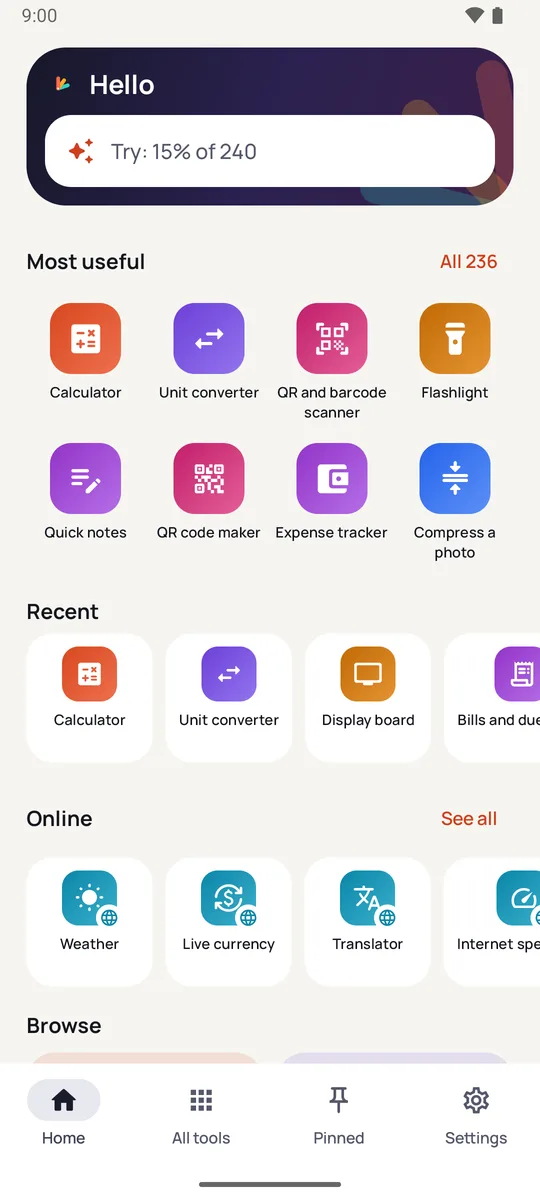
236 everyday tools in one Android app: calculators and converters, PDF, photo and video tools, scanners, timers, notes, boards and scoreboards. 185 of them work with no internet, and there is no account.

One app, not a folder of them
A phone fills up with single-purpose apps: a calculator here, a PDF tool there, a scanner, a flashlight, a unit converter. Toolfold folds them into one small app that asks for almost nothing. Open it and type what you want on the home screen: 15% of 240, 5 km in miles, days until 2030-01-01. The answer is there with no tool to find first, or send any result on to another tool.
In use


What's in it
- Calculate and convert: calculator with history, percentage, tip and split, loan, GPA, unit converter with favourites, time zones and clothing sizes.
- PDF, photo and video: merge, split, sign and compress PDFs, add page numbers and scan documents; remove a background, make a passport photo, compress or resize; trim, compress and mute a video, change its speed, and save its sound or a still picture.
- Everyday tools: QR and barcode scanner and QR maker, flashlight, screen light, magnifier, compass, bubble level, ruler, sound meter, stopwatch and timers that ring with the app closed, world clock and calendar.
- Boards: a display board with your words, an icon, an emoji or your logo, still or moving, and a date board with a big calendar page or days to go.
- Organise: notes, checklists, shopping list, habits, expenses, money you've lent, and bills with reminders.
- For fun: dice, a coin toss with bat or ball, a drum kit, and cricket and volleyball scoreboards.
- Online: 51 tools such as weather, live currency, translator, dictionary and speed test, each marked with a small globe.
Questions
Does it need the internet?
185 of the 236 tools don't. The other 51 carry a small globe, say what they send and to whom, and send nothing until you press their button.
Do I need an account?
No. There is no sign-in, and what you keep stays on your phone. You can back it up to a file of your own and restore it on a new phone.
What does it cost?
It is free and shows ads between tools, never inside one. One optional payment through Google Play removes them. Every tool stays free either way.
Which phones does it run on?
Android 8.0 or later.
How do I get it?
From Google Play: Toolfold on Google Play. It is free to install; removing the ads is optional.
Support
Questions, problems and suggestions: apps@ahmedonics.com. Purchases and refunds are handled by Google Play under its own policies.
Privacy and terms
Read the Toolfold privacy policy and the Toolfold terms of use, and how to delete your data.