
Android app
Numink
A notebook calculator for Android: write calculations line by line and see the results beside each row. Units, percentages, dates, fractions and an equation solver, entirely on your phone. Free, with an optional one-time Pro unlock.
A notebook for numbers
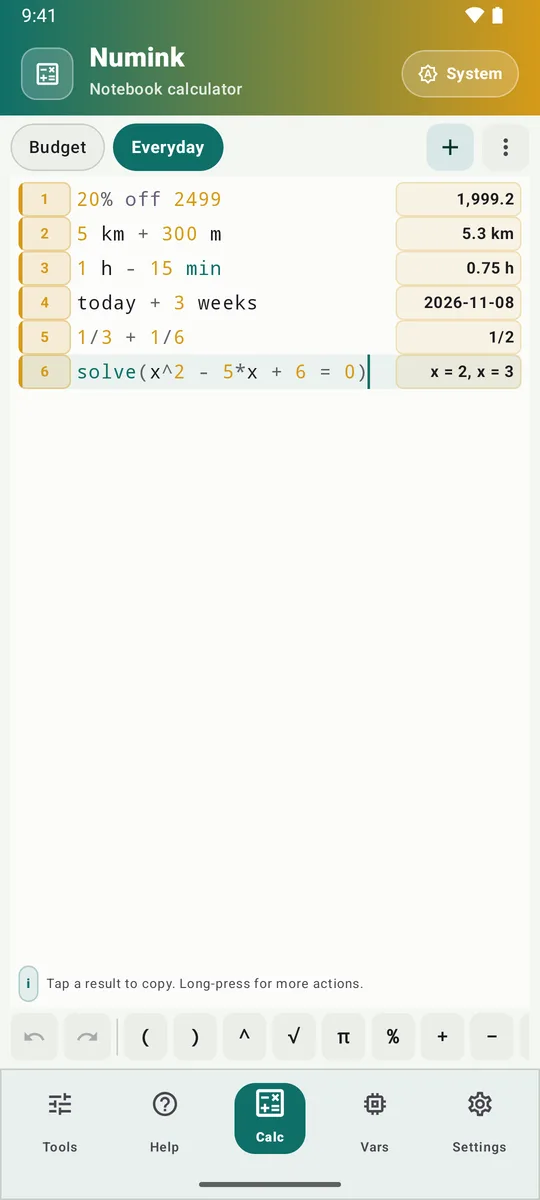
Numink replaces the keypad calculator with a notebook. Write one calculation per line and the answer appears beside it as you type: no equals button, and nothing to retype when a figure changes. Name a value and reuse it (income = 250000, then tax = 18% of income), refer to earlier rows, and total a range with sum, avg, median and more.
Everything runs on the phone. There is no account, no advertising and no tracking, and the calculations work offline.
In use


What it understands
- Percentages in plain words:
18% of 250,250 + 18%,20% off 2499. - Units and conversions:
5 km + 300 m,1 h - 15 min,42 m in ft,5 MB in KiB. - Dates:
today + 3 weeks, the days between two dates. - Exact fractions (
1/3 + 1/6gives1/2) and an equation solver (solve(x^2 - 5*x + 6 = 0)). - Finance (
pmt,fv,npv,irr), trigonometry, logarithms, rounding, gcd and lcm, factorials, combinations and primes. - Number bases and bitwise operators:
0xFF,0b1010,band,bor,shl.
Beside the notebooks sits a toolbox: graph, loan, matrix, big numbers, base converter, password generator, QR code, dates, CSV statistics, paste cleaner, regex tester, Base64, URL encoding, hashes, checksums, UUIDs, colour contrast, text case, word count, number to words, Roman numerals and Unix time.
Free and Pro
| Feature | Free | Pro |
|---|---|---|
| The notebook language: units, percentages, dates, fractions, solver | Yes | Yes |
| Notebooks, new or from a template | Up to 2 | Unlimited |
| Loan, base, password, dates, CSV, hashes, UUID and the other everyday tools | Yes | Yes |
| Graph, Matrix, Big numbers, Regex, Checksum and QR | — | Yes |
| Light and dark themes, colour palettes | Yes | Yes |
| Custom accent colour, AMOLED black, Material You | — | Yes |
| Backup and restore to a file | — | Yes |
Questions
Does Numink need an internet connection?
No. Every calculation runs on the phone. The only network use is Google Play processing the optional Pro purchase.
Where are my notebooks kept?
On your phone only. Nothing is uploaded; uninstalling the app removes them. With Pro you can back everything up to a file you choose and restore it later.
Is Pro a subscription?
No. Pro is paid once through Google Play and stays with your Google account, so you can restore it on a new phone.
Which phones does it run on?
Android 8.0 or later.
How do I get it?
Numink is in closed testing on Google Play. This page will link to its Play listing once it is open to everyone.
Support
Questions, problems and suggestions: apps@ahmedhabib.com. Purchases and refunds are handled by Google Play under its own policies.
Privacy policy
Numink collects, transmits and shares no personal data: your notebooks stay on your phone. Read the Numink privacy policy.
Terms of use
Using Numink means a personal licence for your own devices, with Pro bought once through Google Play. Read the Numink terms of use.